How to Stop Losing 2 Hours to Setup in a Hands-On AI Workshop: A Night-Before Check Script and a 5-Step Day-Of Timetable
In a hands-on AI workshop, setup time isn't an accident. It's a constant that shows up every time. Have participants run a check script the night before and send you a screenshot of the result, then fill the install wait on the day with concept explanations, and setup will no longer cut your curriculum in half.
Who this is for
- Instructors and training managers running their first hands-on AI session for non-developers (coding agents, no-code automation, etc.)
- Anyone who sent an install list in the pre-workshop email, only to find half the room hadn't installed anything on the day
- Workshop organizers who have to run in-person and online at the same time
All you need is your current pre-workshop email and timetable. The script in Step 2 is for Mac, and I ran it myself on macOS 26.5.1 on October 7, 2026.
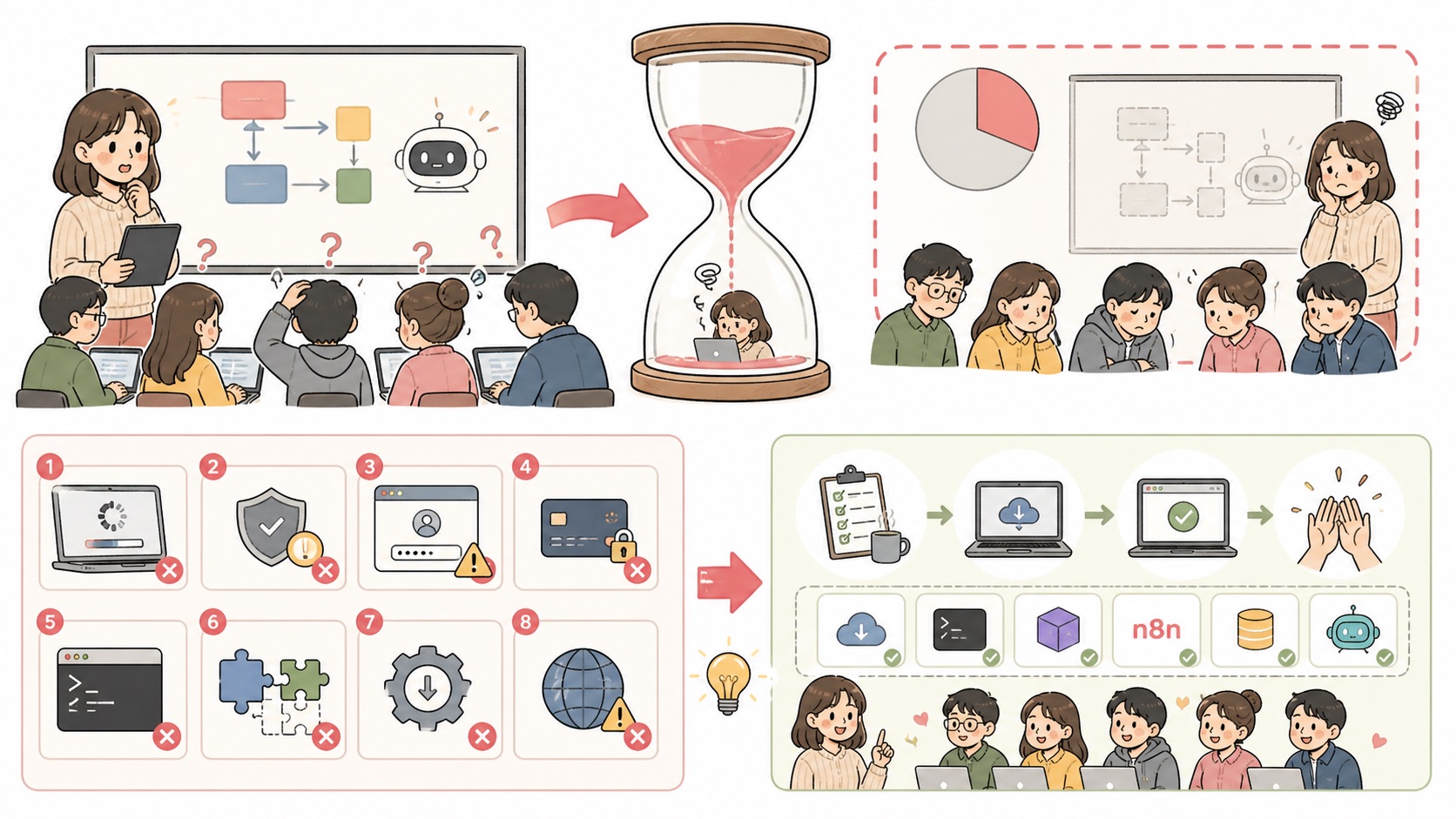
First, a quick note on why I wrote this. In a 5-hour one-day workshop for college students and job seekers, initial setup alone took 2 hours, and we got through only half of the curriculum I had prepared. Most participants were seeing a coding agent, a code editor and a terminal for the first time that day. The installs themselves weren't hard. The problem was that many people got stuck at the same time, each for a different reason, and one instructor had to unblock them one by one.
Step 1. List the 8 common sticking points in your pre-workshop email
These are the real sticking points that piled up in my instructor notes. Most of them go away with a single "that's normal," but hearing it for the first time on the day makes people freeze. So I put this table straight into the pre-workshop email.
| Sticking point | What actually happens | What to tell them in advance |
|---|---|---|
| Not checking login status | Tabs missing or no response | Check the account in the top-right of the app first |
| Thinking the install froze | "I think it's stuck" | 30 seconds to 1 minute is normal |
| Global install permission error | EACCES | Don't add sudo; tell the instructor |
| Korean characters or spaces in folder paths | Paths aren't recognized in later exercises | Use English folder names |
| Windows security alerts | Stuck at a SmartScreen or firewall pop-up | It's OK to click Allow |
| macOS permission pop-ups | Folder access approval window | Click Allow |
| Not returning to the app after browser login | Approved, but it doesn't go back to the app | Don't refresh; wait a moment |
| Company or school laptop policies | Installs blocked entirely | Bring a personal laptop |
There's almost no way to fix the last one on the day. Make it the boldest line in your pre-workshop email.
Step 2. Have participants run a check script the night before
If you just send an install list, most people won't read it. So I added a mechanism that sends results back. The night before, participants paste the whole block below into Terminal and send a screenshot of the final screen.
cat > ~/Desktop/setup-check.sh <<'SCRIPT'
#!/bin/bash
# Pre-workshop check to run the night before (macOS)
ok(){ echo "✅ $1"; }; ng(){ echo "❌ $1"; FAIL=1; }
FAIL=0
echo "macOS $(sw_vers -productVersion)"
command -v git >/dev/null && ok "git $(git --version | awk '{print $3}')" || ng "git missing → xcode-select --install"
command -v node >/dev/null && ok "node $(node -v)" || ng "node missing → install the LTS from https://nodejs.org"
command -v npm >/dev/null && ok "npm $(npm -v)" || ng "npm missing (installed together with node)"
FREE=$(df -g ~ | awk 'NR==2{print $4}')
[ "$FREE" -ge 5 ] && ok "Free space ${FREE}GB" || ng "Free space ${FREE}GB (please free up 5GB or more)"
DIR="${1:-$HOME/ai-workshop}"
case "$DIR" in *[[:space:]]*|*[가-힣]*) ng "Work folder path contains spaces/Korean characters: $DIR";; *) mkdir -p "$DIR" && ok "Work folder $DIR";; esac
for h in registry.npmjs.org github.com; do
  curl -s -m 8 -o /dev/null "https://$h" && ok "Internet connection $h" || ng "Could not reach $h (check company network/VPN)"
done
[ $FAIL -eq 0 ] && echo "All checks passed. Please take a screenshot of this screen and send it." || echo "Fix the ❌ items, or take a screenshot of this screen and send it to the instructor."
SCRIPT
bash ~/Desktop/setup-check.sh
Here's the actual result from running it on a Mac on October 7, 2026.
macOS 26.5.1
✅ git 2.55.0
✅ node v26.7.0
✅ npm 11.19.0
✅ Free space 60GB
✅ Work folder /Users/popcorn/ai-workshop
✅ Internet connection registry.npmjs.org
✅ Internet connection github.com
All checks passed. Please take a screenshot of this screen and send it.
Adapt the checks to your own workshop. For example, if you use a coding agent, add one more command -v line to check that the tool is installed. If you only contact the people whose screenshots show a ❌ the night before, you'll have far fewer one-by-one fixes on the day.
Step 3. Lock in "everyone installs together, concepts while you wait" for the first block of the day
Even with the night-before check, there's still installing and logging in on the day. Don't leave that time empty. I nailed down this order in my instructor notes.
| Order | Time | What happens |
|---|---|---|
| 1 | 30 seconds | Demo of what we'll build today |
| 2 | 5 minutes | Everyone starts installing and logging in at the same time |
| 3 | 15-20 minutes | Concept explanation while downloads run (e.g., why we keep work in one folder) |
| 4 | The rest | Individual hands-on work |
People who finish early listen to the concepts, and people who are slower catch up during that time. Nobody sits around waiting for everyone's install to finish.
Step 4. Announce the watch-along mode and the minimum guaranteed outcome at the start
I say these two sentences word for word at the start.
- "If your install doesn't work, you're welcome to just watch. You'll get today's finished result afterward."
- "Today's minimum goal is up to ○○. After that, it's fine if everyone finishes at a different point."
The first sentence lets stuck participants move over to watching a neighbor's screen without feeling guilty. The second splits the goal into two tiers. In that workshop, "finish a Chrome extension in 3 hours" was an aggressive goal. If I ran it again, I'd set the minimum at "load the extension into the browser and follow its structure and debugging flow."
So that stuck participants don't have to start over, save a finished version for each stage (checkpoints) in advance so they can jump straight back to the right stage.
Step 5. Make the first exercise something small that finishes within 30 minutes
Don't dive straight into a big project. Start with something that finishes within 30 minutes, like a Pomodoro timer or a habit-tracker app, so people get used to the flow of "ask the AI for something small and check it with your own eyes." The flashy demo comes after that.
The flashier the result, the more variables there are, such as an external site's structure and browser permissions. If that site changes on the day, the whole demo falls apart, so prepare a recording and a finished version as a fallback.
When this happens, do this
| Situation | Response |
|---|---|
| Only half the participants sent their check screenshots | Set aside a check-in slot 15 minutes before the class, and have those who didn't send one run the script first |
Several people show ❌ node missing | Resend the install link the night before, and fold it into the simultaneous install time in Step 3 on the day |
| Installs blocked on a company laptop | Hard to fix on the day. Point them to the watch-along mode and share the result |
| No response from online participants | Ask for frequent check-in signals, like "type 1 in the chat when you see ○○ on your screen." For hands-on workshops, consider running online as a separate session |
| Stuck with one person for more than 10 minutes | Switch them to the watch-along mode and look again during the break |
One more note on online. That day there were 13 online participants, more than in the room, but with cameras off and almost no reactions, I had no way of knowing who was stuck. My conclusion is that in a hands-on workshop, online and in-person need different ways of stepping in.
Wrap-up
Setup time wasn't about the instructor's skill. It was a structural problem. Get results back with a night-before check script, fill the install wait on the day with concept explanations, and announce the watch-along mode and the minimum guaranteed outcome right at the start, and you'll keep far more hands-on time out of the same 5 hours.