Keep Working When You Hit Claude Code's Usage Limit: Build a claude-api Command on API Credits in 5 Steps
If you use Claude Code on a Team or Max seat and hit the usage limit, your work stops until the limit resets. If you have API credits, you can set up one command called claude-api, type claude-api -c, and pick up the conversation you were just in and keep going on credits. This is the order I followed on October 18, 2026, setting it up and verifying it with the $1,000 in credits I got from Claude Startups.
Who this is for
- You use Claude Code on Claude Team (Standard or Premium) or Max and hit the limit often
- You're worried that API credits from a startup program or promotion will expire unused
- You're wondering, "Can't I just rotate through several Team seats myself?" (I'll explain below why that doesn't work)
Here's what you need.
- macOS Terminal (zsh) and Claude Code installed. I tested on version 2.1.302
- A Claude Console organization that holds credits
- A password manager to store the key (optional)
First: rotating through multiple seats is not allowed
You'll often see tricks shared for "automatically switching to the next account when one runs out of usage." A typical case is one person using 5 Team seats. But the official help page states clearly that each seat is assigned to one designated person and only that person can use it, and routing work through someone else's account to use their remaining usage isn't allowed either (Purchase and manage seats on Team plans). If you need more, it tells you to upgrade to a Premium seat or turn on usage credits.
Startup program benefits only last as long as you follow the terms, so if you get caught rotating accounts, you could lose your Team discount and your credits along with it. The method in this post is the same person using their own API key, so this issue doesn't apply.
| Approach | Cost after the limit | Notes |
|---|---|---|
| Rotating through multiple seats | None | Violates policy. Each seat is for one person only |
| Turning on Team usage credits | Standard API rates, billed separately | Enable under organization settings > Usage |
| Continuing with an API key (this post) | Deducted from API credits you already have | Good when you want to use up credits first |
Step 1. Check your credit balance and auto-reload status
Open Claude Console > Billing. First, check in the top right that the organization holding your credits is selected.
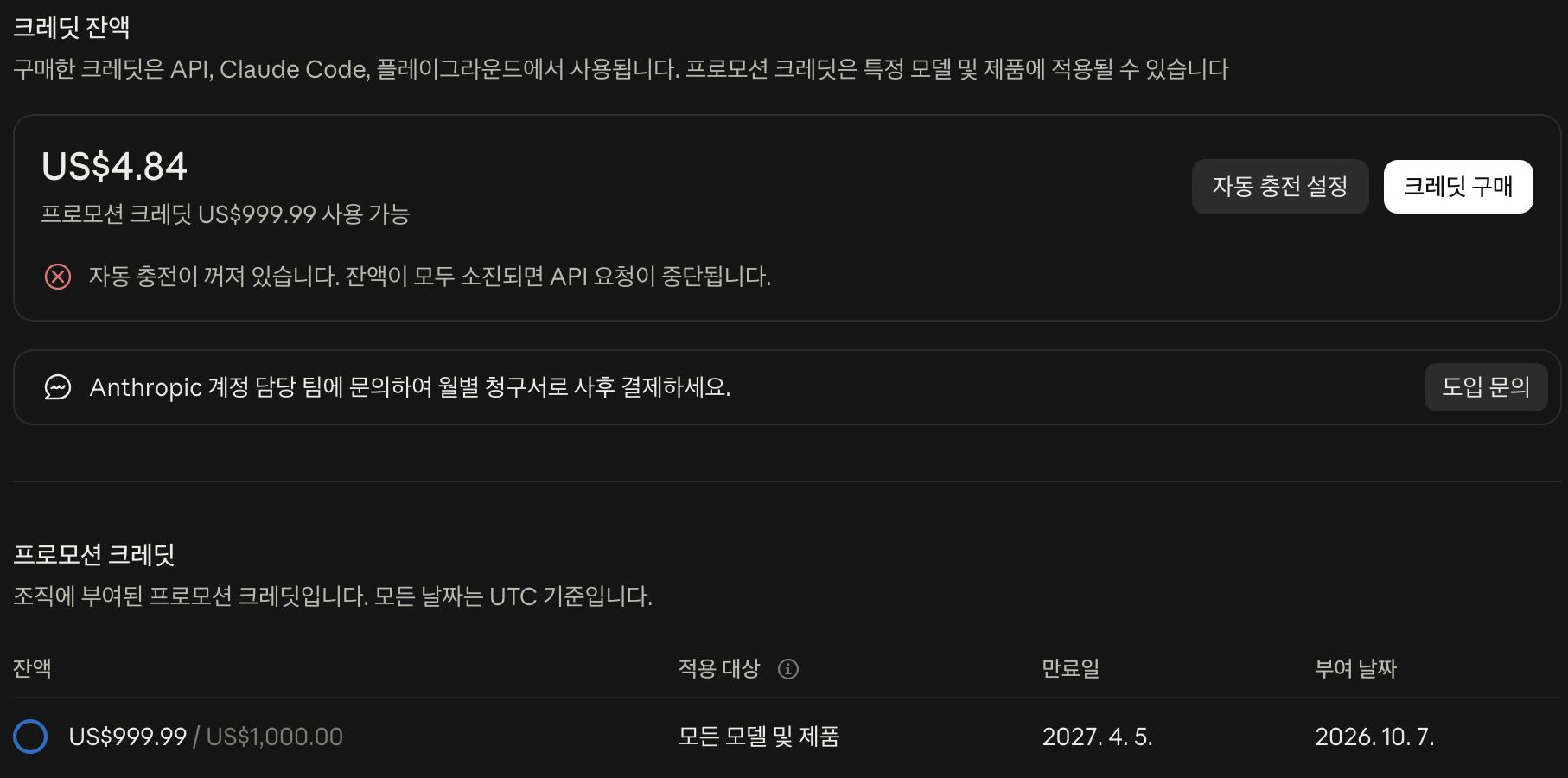
There are two things to look at.
- The balance and expiry date in the promotional credits table. In my case it's $1,000, expiring April 5, 2027 (UTC). The $999.99 in the screenshot above is after I spent 1 cent on the tests in this post.
- "Auto-reload is off. API requests will stop when your balance runs out." If you see this, using up your credits won't charge your card; requests just stop. If you only want to spend within your credits, leave it off.
Team and Max plans come with monthly API credits (up to $500 on Team). But according to the official docs, these monthly credits can't be used for Claude Code. The claude-api command in this post only draws from separately granted credits, like startup credits, or credits you've purchased. If you run it with a key from an organization that only has monthly credits left, you get Credit balance too low. It's fine to link the monthly credits to the same Console organization: they're used first for other things like API automation, and Claude Code requests are paid from the remaining credits. How to link the monthly credits and split them by use is in Steps 12 and 13 of my Claude Team plan post.
Step 2. Create an API key just for Claude Code
In Console > API keys, click Create key. If an identity federation notice appears first, click Continue with API key.
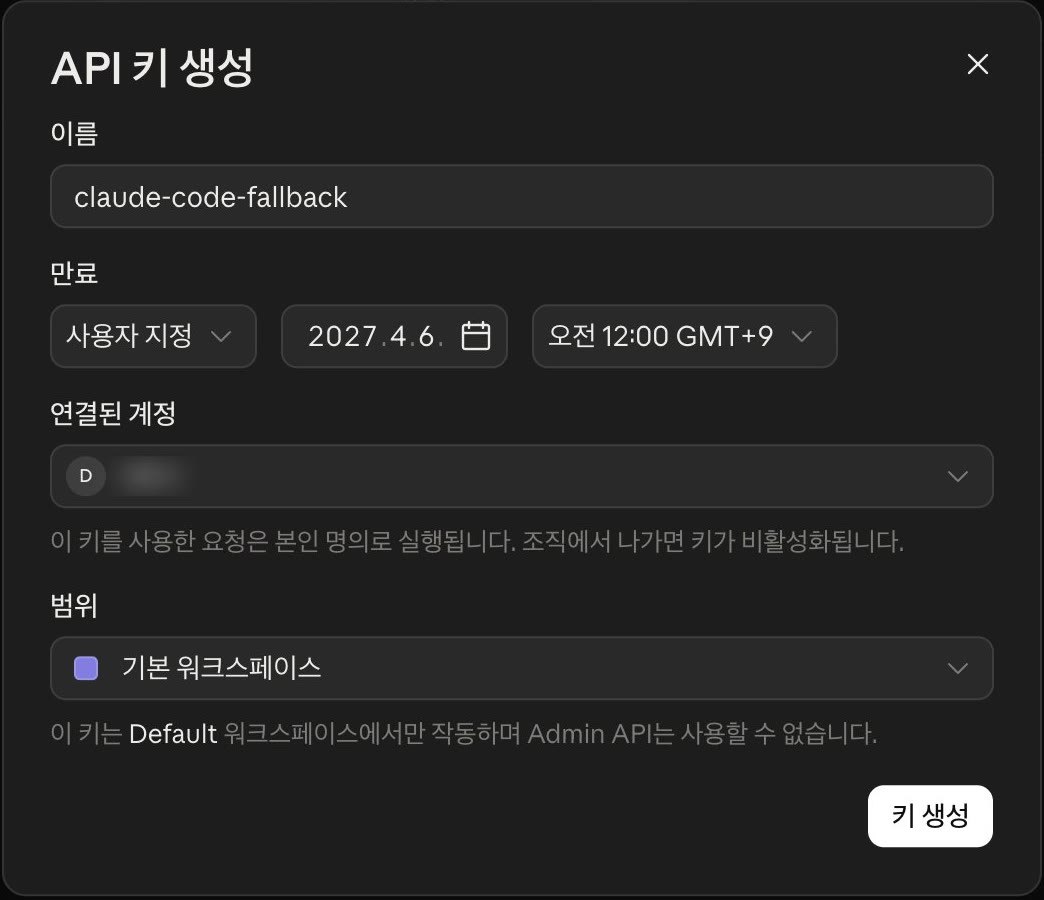
| Field | Value | Why |
|---|---|---|
| Name | claude-code-fallback | So you can break down costs by key later |
| Expiry | Custom, the day after your credits expire | So the key doesn't outlive the credits and fall through to card billing |
| Scope | Default workspace | Minimum permissions, no Admin API access |
When you click Create key, the key is shown only once. Click Copy key and save it in your password manager first. Once you close the dialog, you can't see it again.
Step 3. Save the key in a file only you can read
Run the following in Terminal. read -rs doesn't echo what you type, so after running it, paste the key you copied and press Enter.
mkdir -p ~/.config/claude-api && chmod 700 ~/.config/claude-api
read -rs KEY && printf '%s' "$KEY" > ~/.config/claude-api/key && chmod 600 ~/.config/claude-api/key && unset KEY
ls -l ~/.config/claude-api/key   # -rw------- means it's correct
The reason not to put the key in .zshrc as export ANTHROPIC_API_KEY=... is that your regular claude would then always run on the API key too, and credits would get used up before your Team or Max usage. The key is only loaded when you run the command below.
Step 4. Create the claude-api command
Create an executable in the folder where Claude Code is installed (~/.local/bin). If which claude shows a different path, change the path on the last line to match.
cat > ~/.local/bin/claude-api <<'EOF'
#!/bin/zsh
# Runs Claude Code with the Console API key (credits).
KEY_FILE="$HOME/.config/claude-api/key"
if [[ ! -r "$KEY_FILE" ]]; then
  echo "API key file not found: $KEY_FILE" >&2
  exit 1
fi
export ANTHROPIC_API_KEY="$(<"$KEY_FILE")"
exec "$HOME/.local/bin/claude" "$@"
EOF
chmod 755 ~/.local/bin/claude-api
Since it doesn't touch .zshrc, there's no conflict even if you manage your dotfiles with git. The command sets ANTHROPIC_API_KEY for that run only and passes every other option straight through to claude.
Step 5. Confirm it's actually billing your credits
I checked three things.
1) Whether you get a response
claude-api -p "Reply with exactly: OK" --model haiku
# OK
2) Whether the key is used instead of the logged-in account. If you deliberately pass a wrong key, it should fail.
ANTHROPIC_API_KEY=sk-ant-invalid-test claude -p "Reply OK" --model haiku
# Invalid API key · Fix external API key
This means the key in the environment variable takes priority over your login, so requests run through claude-api are deducted from your credits. Sure enough, after testing, my Console balance went from $1,000.00 to $999.99 (the Step 1 screenshot).
3) Whether it continues the previous conversation
claude-api -p "Remember this word: PINEAPPLE. Reply only: saved" --model haiku
# saved
claude-api -c -p "What word did I ask you to remember? Reply with the word only." --model haiku
# PINEAPPLE
Claude Code stores conversation history on your computer (per project folder), so adding -c in the same folder continues the previous conversation even when the authentication method changes.
How to use it
| Situation | Command |
|---|---|
| Day to day (Team or Max seat usage) | claude |
| Continuing a rate-limited task on credits | claude-api -c |
| Big jobs you want to run on credits from the start | claude-api |
Credits disappear when they expire. In my case I need to spend $1,000 over about 5.5 months, which works out to a pace of roughly $180 a month. If I only used it when I hit the limit, I'd likely have credits left over, so I run long jobs like big refactors or batch work on claude-api from the start. I also set a reminder on the 1st of every month to check my balance and last month's spend.
If you moved from Max to Team: cancel your personal subscription
Starting Team doesn't automatically cancel your existing personal Max subscription. In claude.ai, open the account menu at the bottom left, switch to your personal account (for example, "Personal Max"), then go to Settings > Billing > Cancel subscription > Cancel. If you open billing settings with the Team organization selected, you get the Team organization's billing page, and it also has a Cancel button. Clicking it there cancels Team, so first check that the page title says "Max plan."

Once you cancel, it changes to "Your subscription will be canceled on [date]," and you can keep using Max until then. If you change your mind, use Resubscribe to undo it. As long as you don't delete the account itself, your existing conversations and projects stay.
Troubleshooting
| Symptom | Cause | Fix |
|---|---|---|
API key file not found | The file from Step 3 is missing or has a permissions problem | Check with ls -l ~/.config/claude-api/key and save it again |
Invalid API key | The key was pasted wrong, or it expired or was deleted | Check the key's status in the Console and repeat Step 3 with a new key |
Regular claude also uses up credits | ANTHROPIC_API_KEY is exported in .zshrc or similar | Delete that line and open a new Terminal |
claude-api -c continues a different conversation | You ran it from a different folder | Run it from the project folder you were working in |
| Requests stop after credits run out | Auto-reload is off (intended behavior) | Leave it, or buy credits if you need them |
command not found: claude-api | ~/.local/bin isn't on your PATH | Create the file in the folder shown by which claude |
Credit balance too low (even though credits seem to remain) | All that's left is Team or Max monthly API credits, which can't be used for Claude Code | Check the Console billing page for separately granted or purchased credits |
Wrap-up
To sum up, you create one key in the Console and add one file plus one executable, and you're done. You use your seat limit as your seat limit and continue overflow work on your own credits, so there's no worry about getting into trouble by rotating accounts. I'll follow up after a month with how fast the credits actually go down.