
AI Says "+124% Growth": 7 Steps to Check Before You Believe It (A Data Analysis Pitfall Checklist)
Before you copy an AI-generated analysis into a report, check just seven steps in this order: baseline period → sample → unit counted → source → causation. That catches most numbers that look plausible but are wrong.
Ask an AI to "analyze this data" and you get tables and charts within minutes. The problem is that the results look plausible even when they're wrong. And when the number is big, like "+124% growth," people actually stop questioning it. A big number feels like evidence in itself.
Every example number in this post is one I calculated myself from public data anyone can download (World Bank, Wikipedia page views).
Who this is for
- You've given ChatGPT, Claude or Gemini an Excel or CSV file and asked it to analyze it
- You're a leader or planner who has to review and sign off on "up ○○%" reports from teammates or AI
- You're a job seeker building a data analysis portfolio and worried "Will this conclusion get torn apart in an interview?"
You need two things.
- One analysis result produced by AI (a sentence, table or chart, anything works)
- The AI chat window that produced it (you'll ask it to recalculate in the same window)
You don't need any statistics background. Every concept is explained from scratch at the step where it's needed.
Step 1. Pull out only the "number sentences" and write down what each compares against
Before reading the whole analysis, pull out just the sentences that contain numbers. Then next to each sentence, write "what is this number compared against?"
| Sentence the AI wrote | Comparison baseline |
|---|---|
| Air passengers increased 124% | 2023 vs. 2021 |
| April weekend interest fell 19% | First Saturday of April vs. first Saturday of March |
If there's a sentence where you can't write down a baseline, that's the first problem. Ask the AI chat window:
For every sentence in your result that contains a % change, make a table showing what (period and target) it was compared against.
Flag any sentence whose baseline isn't in the data.
This table is the starting point for the steps that follow.
Step 2. Check whether the baseline period was an "abnormal time"
A rate of change is "current value ÷ baseline value − 1." If the baseline (the denominator) is abnormally small, the rate of change gets big automatically. So when you set the baseline decides half the conclusion.
Let's calculate with real data: the number of domestic and international passengers carried in a year by Korean-registered airlines, published by the World Bank (indicator code IS.AIR.PSGR).
| Year | Passengers |
|---|---|
| 2019 | 92.43 million |
| 2020 | 30.03 million |
| 2021 | 34.02 million |
| 2023 | 76.27 million |
It's the same 2023 number, but the conclusion changes depending on the baseline.
- vs. 2020: +154.0%
- vs. 2021: +124.2%
- vs. 2019: −17.5%
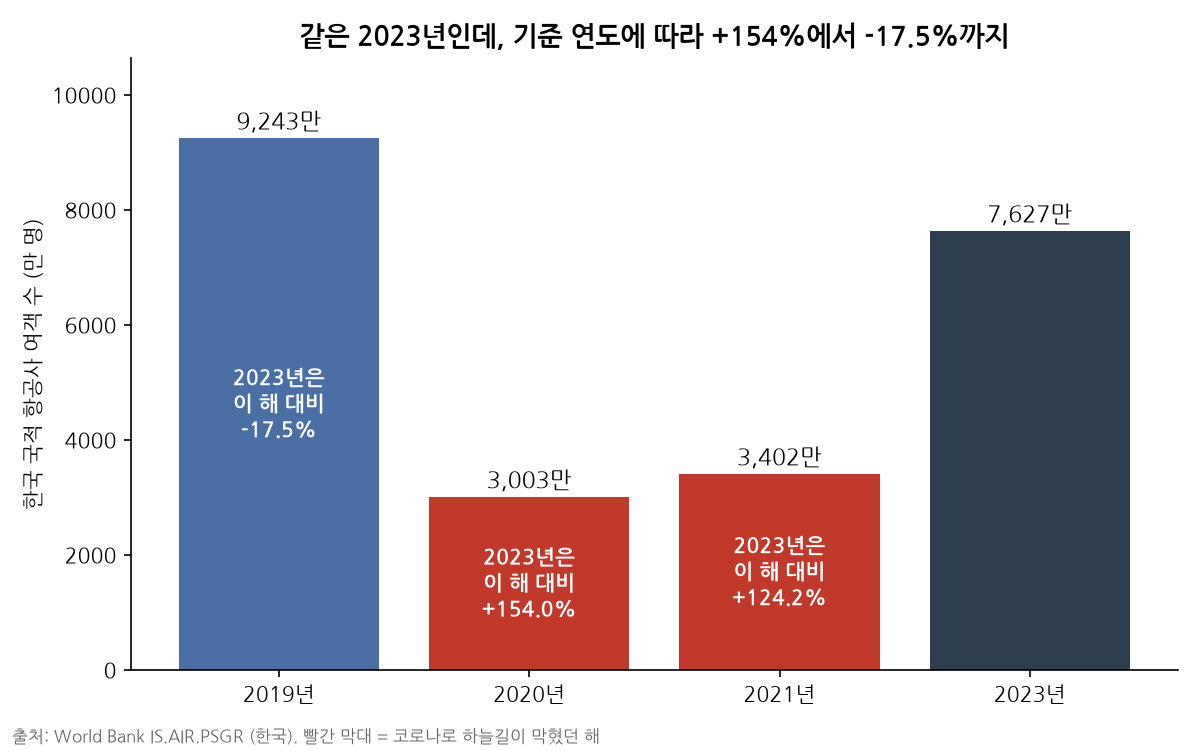
"Air passengers surge 124%" and "still 17.5% below pre-COVID levels" are both correct numbers. In 2020-2021, COVID had nearly shut down air travel, so using those years as the baseline makes a recovery read like growth.
Checking takes three lines.
- Find the baseline period in your Step 1 table.
- Check whether anything unusual happened then: COVID, a disaster, a policy change, a major holiday.
- If so, have it recalculate using a normal period as the baseline.
Recalculate the same rate of change using 2019 (or a year with no special events) as the baseline.
Show both results side by side and tell me in one line whether the conclusion changes.
Step 3. Check whether it compared single points, then widen the range and recalculate
A sample is the slice of data used to reach a conclusion. If you compare one day against one day, like "first Saturday of March vs. first Saturday of April," your sample is just two points. The number swings a lot depending on whether it rained or whether it was a public holiday.
I calculated this myself using the daily page views of the Korean Wikipedia article on Busan (부산광역시) for March-April 2025.
| Comparison method | March | April | Change |
|---|---|---|---|
| First Saturdays | 207 (3/1) | 167 (4/5) | −19.3% |
| Second Saturdays | 258 (3/8) | 139 (4/12) | −46.1% |
| Average of all Saturdays | 180.2 | 149.8 | −16.9% |
| Daily average for the whole month | 188.7 | 212.6 | +12.6% |
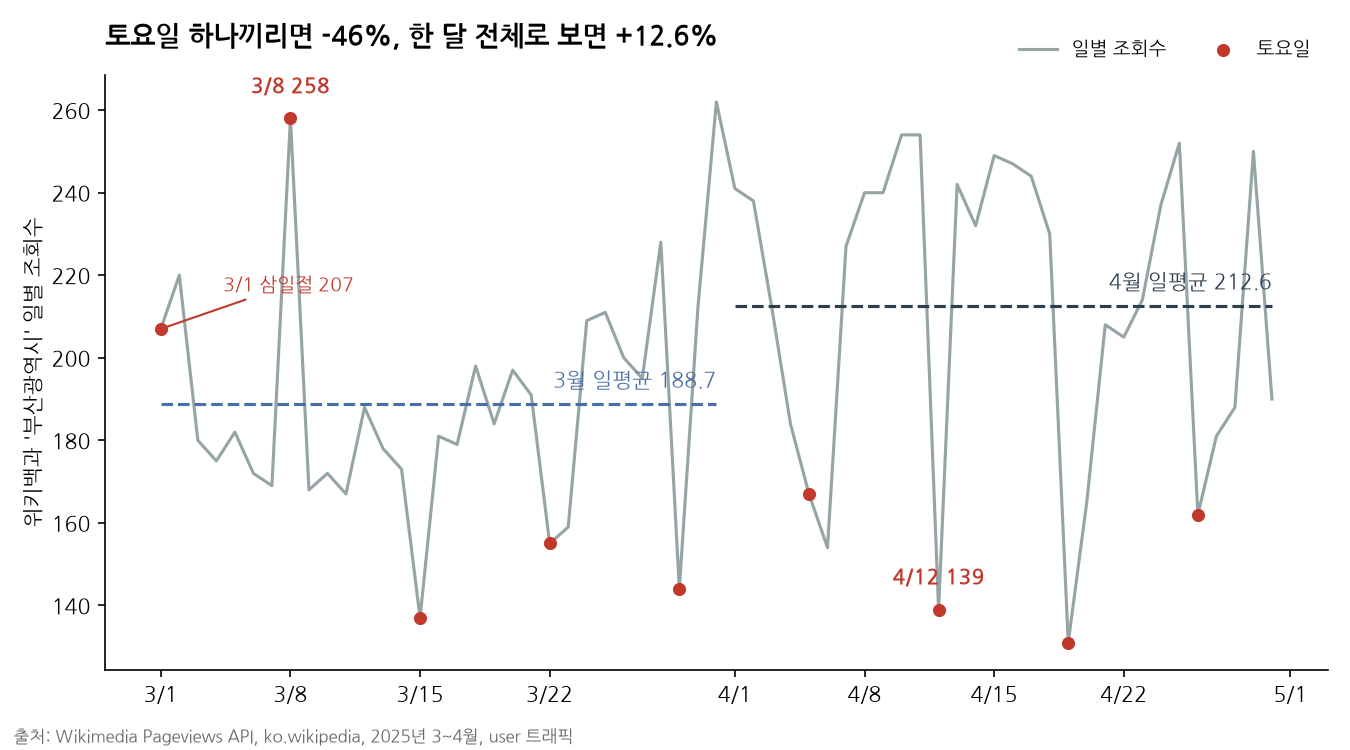
Depending on which Saturday you pick, you get −19% or −46%, and if you look at the whole month, the direction flips to an increase. On top of that, March 1 was Samiljeol (Independence Movement Day), a public holiday in Korea. A special day was hiding inside the ordinary-looking baseline of "first Saturday."
Check in this order.
- Count how many dates (or records) the comparison used. If it's one or two, widen it.
- Recalculate using the overall average or total for the same period.
- See whether the direction of the result (increase/decrease) holds. If the direction changes, don't use the original conclusion.
Tell me how many dates you just used in the comparison.
Recalculate using the daily average for the whole period, and flag any public holidays or long weekends mixed in.
Also tell me whether the direction of the conclusion changes.
One more thing to check. With data where the absolute numbers are small, like around 200 page views a day, a difference of a few dozen in a day moves the rate of change by tens of percent. A big percentage change on a small number is more likely noise than signal.
Step 4. Check whether "what was counted" matches the question
If the AI counted data by keyword or name, check that the words aren't mixed up with other meanings. Keyword counts count letters, not meaning.
For example, the Korean keyword "동해 여행" (Donghae travel) mixes trips to Donghae City in Gangwon Province with trips to the East Sea (also called 동해 in Korean). You want to analyze the city, but you end up counting seaside posts too. If you narrow it to "동해시 여행" (Donghae City travel), you miss posts that left out "City" and undercount. In cases like this, rather than committing to a single number, it's more honest to report a range: "narrow count to broad count."
At this step, check two more things.
- Official name vs. everyday name: If the name people actually search for ("Jeju-do") differs from the official administrative name ("Jeju Special Self-Governing Province"), check both.
- Adjusting for population and size: "It happened most in Seoul" may just be because Seoul has the most people. Look at values divided by size as well, such as per capita or per 10,000 people.
Check whether the keywords or names counted in this analysis could be mixed up with other meanings (homonyms, common nouns).
If they could, count them with a narrow and a broad definition and show the result as a range.
If this compares regions or groups, also calculate values divided by population or size.
Step 5. Check whether the place the data came from (the source) leans a certain way
Source bias is a skew that comes from where the data was collected. If you analyze a neighborhood by collecting blog posts, "cafés" can easily come out on top. Not because the neighborhood is famous for cafés, but because blogs as a medium are full of café posts to begin with.
There's one way to check: apply the same criteria to other targets. If cafés come out on top in every other neighborhood too, that's a trait of the source, not of the target. Comparing targets of similar size cancels out the shared bias and leaves only the real difference.
Source bias can also create things that "aren't there." Blogs and reviews are full of praise, and complaints get posted less often. Even if the result says "almost no complaints about parking," that might not be because parking is easy, but because the source is one where those posts rarely appear.
Check whether the item that came out on top in this result reflects a general tendency of the data source (medium).
Suggest a way to check whether the same item still comes out on top when the same criteria are applied to 3 comparison targets.
Also point out whether results where something shows up rarely, like "no complaints," could be due to the nature of the source.
Step 6. If you see "because," ask three causal questions
If the AI's result says things like "thanks to the opening" or "due to the campaign," stop. Overlapping timing alone doesn't let you call something a cause. Check these three things.
- Trend before the intervention: Was it already rising before that event? If it was flat and then turned at that moment, it's more likely to be a cause.
- Comparison with other places: Did other places where the event didn't happen rise just as much in the same period? If so, the cause may be a shared factor like the season or the economy.
- The link in between: Can you confirm the intermediate steps with data, as in "opening → shorter travel time → inflow of a specific age group"?
Find the sentences in this result that assert a cause.
For each sentence, make a table showing whether (1) the trend before the intervention, (2) a comparison target with no intervention and (3) the intermediate link
were confirmed with data, and rewrite any sentence you couldn't confirm to the level of "is associated with."
Step 7. Run the remaining pitfalls all at once with a review prompt
Steps 1-6 cover the most common pitfalls. To check the rest without missing anything, paste the prompt below as is into the chat window where the analysis was done.
Review the analysis you just produced against the 15 criteria below.
For each item, judge it as one of [No issue / Suspicious / Can't verify],
and if it's Suspicious, write the reason and a way to recalculate in one line.
At the end, split the conclusion sentences into ones that can be used as is and ones that need fixing.

1. Unit: Did you count by the name people actually use, not just the official administrative name?
2. Homonyms: Could the keyword be mixed up with a common noun or another meaning?
3. Mentions ≠ destination: Did you claim something is a "place people want to go" just because it's mentioned a lot?
4. Baseline period: Did you use an abnormal time, like COVID, a disaster or a holiday, as the baseline?
5. Size adjustment: Did you compare absolute values without adjusting for differences in population or size?
6. Absolute value vs. rate of change: Did you use the metric that fits whether the question is about "big places" or "rising places"?
7. Sample noise: Is this a single-point comparison, like one day or one record? Does it hold when you widen the range?
8. Small numbers: Did you read a big rate of change on data with small absolute numbers as a signal?
9. Source genre bias: Did you read an item the source medium naturally covers a lot as a trait of the target?
10. Source positivity bias: Did you conclude there are "no" complaints or problems from a source that is mostly praise?
11. Causation: Did you assert a cause just because the timing overlapped?
12. Recurring events: Did you treat a festival or season that repeats every year as the cause of a change unique to this year?
13. Interest ≠ action: Did you treat search volume or social media mentions as the same as actual visits or purchases?
14. Data scope: Did you check the collection period and any cap on the number of records?
15. Reader's perspective: Did you present something everyone already knows as if it were a new finding?
On October 7, 2026, I deliberately wrote three wrong analysis sentences using this post's numbers and ran this prompt once. They were: "It surged 124.2% vs. 2021, so demand for overseas travel has exploded," "Comparing first Saturdays, it fell 19.3%, so interest has cooled," and "It's because the cherry blossom festival ended" (Codex CLI, gpt-5.5 model).
| Pitfall | AI's verdict |
|---|---|
| Using 2021 as the baseline (item 4) | Suspicious. Suggested looking at it as a recovery rate alongside 2019 |
| Comparing single Saturdays (item 7) | Suspicious. Suggested rechecking with the monthly average or a moving average |
| Asserting it was because of the cherry blossom festival (items 11 and 12) | Suspicious. Suggested comparing with the same period the previous year |
| Talking about "overseas travel" with a passenger count that includes domestic flights (item 1) | Passed as No issue |
| March 1 being the Samiljeol public holiday (item 7) | Not mentioned |
It caught the baseline period, the single-point comparison and the causal assertion, but missed what was counted (that the metric includes domestic flights) and the special day on the calendar. Both are things you only notice by looking at the data definition and the calendar yourself. This was a single run, so results may differ with other models or other analyses. That's why, even when the AI says "No issue," a person still checks Steps 1-6 directly.
Items the AI marks "Suspicious" go back through the recalculation prompts in Steps 2-6. But for source bias (items 9 and 10) and causation (item 11), a person takes one more look even when the AI says "No issue," because judging them requires context from outside the data.
Many people try to check all 15 from the start and never finish the analysis. If you're short on time, treat only three as mandatory: baseline period (item 4), sample (item 7) and unit (item 1). Running the rest before you submit the report is enough.
If you get this result, do this
| What you found | What it means | What to do |
|---|---|---|
| Changing the baseline flips growth into decline | Baseline period illusion | Use the number based on a normal period in the body, and label the original number as "vs. the low point" |
| Widening the period changes the direction of the rate of change | Sample noise | Drop the single-point conclusion and rewrite it based on the period average |
| Public holidays or long weekends are mixed into the compared dates | Special-day effect | Remove the special days, or compare the same weekday under the same conditions |
| Big gap between the narrow count and the broad count | Homonym or unit problem | Report a range instead of a single number |
| The same item comes out on top for every other target too | Source bias | Drop the "trait of the target" conclusion and recompare relative rankings among similar targets |
| It was already rising before the intervention | Not enough causal evidence | Change "thanks to" to "around the same time as," and find additional comparison targets |
| The AI answers "Can't verify" for most items | The original data or source information isn't in the chat window | Re-attach the original file and how it was collected (period, source), then review again |
Wrap-up
- The bigger the number, the sooner you write down "compared against what?"
- The baseline period, the sample and the unit counted can change even the direction of the conclusion. For air passengers, just changing the baseline gave both +124% and −17.5%, and for page views of the Busan article, just changing the compared dates flipped a decline into an increase.
- Use AI as a tool that redoes calculations quickly, and leave the final call on source bias and causation to a person.
Automation is closer to "AI processes it fast and a person questions it" than "AI does it all." The review prompt above packages that questioning into a reusable form so you don't have to do it from scratch every time.
Data sources: World Bank Open DataIS.AIR.PSGR (Air transport, passengers carried, Korea), Wikimedia Pageviews API (ko.wikipedia '부산광역시', user views, March-April 2025). Downloaded and calculated on October 7, 2026.